by
Jesse Marangoni aka TheCanadian | 5 November 2005The various
filter classes that come bundled with Flash 8 are a fast way to create effective
visual effects. This tutorial will teach you how to apply a filter to a movie
clip instance and then animate it, all with ActionScript.
Our finished animation will look similar to the following animation:
[ hover over the text to see a filter effect in
action ]
In this tutorial, I focus mainly on the Glow Filter, but all effects can be
implemented similarly.
So, let's get started:
- Okay, let’s get started by downloading the provided incomplete source
below. Don't worry, the main portions of the animation have been left for us
to implement:
- Once you unzip and open the file (filterIncomplete.fla), you should see a movie clip on the
stage containing some text. Give the movie clip the instance name of kText
so that we can apply methods and properties to it.
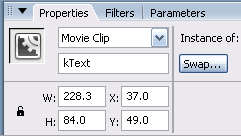
[ give your movie clip the caption
kText ]
- Next, open up the actions panel for the first frame of the
actions layer. Add this code to it:
- import flash.filters.GlowFilter;
- var gf:GlowFilter
= new
GlowFilter(0x356D83,
100, 3,
3, 5,
3, false,
false);
- kText.filters
= [gf];
- kText.onRollOver
= function()
{
- this.onEnterFrame
= function()
{
- if (gf.blurX
< 20)
{
- gf.blurX++;
- gf.blurY++;
- } else
{
- delete
this.onEnterFrame;
- }
- this.filters
= [gf];
- };
- };
- kText.onRollOut
= function()
{
- this.onEnterFrame
= function()
{
- this.filters
= [gf];
- if (gf.blurX
> 3)
{
- gf.blurX--;
- gf.blurY--;
- } else
{
- delete
this.onEnterFrame;
- }
- };
- };
- If you test the animation you should see the text with a glow
filter applied to it. If you roll over the text, the blur of the filter will
grow and when you roll out it will shrink back down to its original size.
On the next page, I will explain the code so that you can have a better
understanding of how to implement and modify this and other effects in your
animations.
Onwards to the next page!
|



 Applying and Animating Filter Effects
 Download Partial Source for Flash 8